> ## Documentation Index
> Fetch the complete documentation index at: https://docs.anglpay.com/llms.txt
> Use this file to discover all available pages before exploring further.
# Authentication with JWTs
The API uses **Bearer (Token) Authentication** to authenticate any
request. These tokens are **JSON Web Tokens (JWT)** which need
to be created server side by your app. By far the easiest way to create a JWT
is with one of the [server-side SDKs](./authentication) but it is also
possible to generate the JWT without the SDKs using any number of open source JWT libraries.
This document defines the API specification for authentication, JWT claims, and signature mechanisms.
## Authenticate an API call
Every API endpoint that requires authentication expects an `authorization` HTTP-header
with a signed JWT token as its value (prefixed with `bearer`).
```bash theme={"system"}
curl -i -X GET "https://api.anglpay.gr4vy.app/transactions" \
-H "authorization: bearer eyJhbGciOiJIUzI1NiIsInR5cCI6IkpXVCJ9.eyJzdWIiOiIxMjM0NTY3ODkwIiwibmFtZSI6IkpvaG4gRG9lIiwiaWF0IjoxNTE2MjM5MDIyfQ.SflKxwRJSMeKKF2QT4fwpMeJf36POk6yJV_adQssw5c"
```
## Create an API key
To sign a JWT, create a new API key-pair in the dashboard.
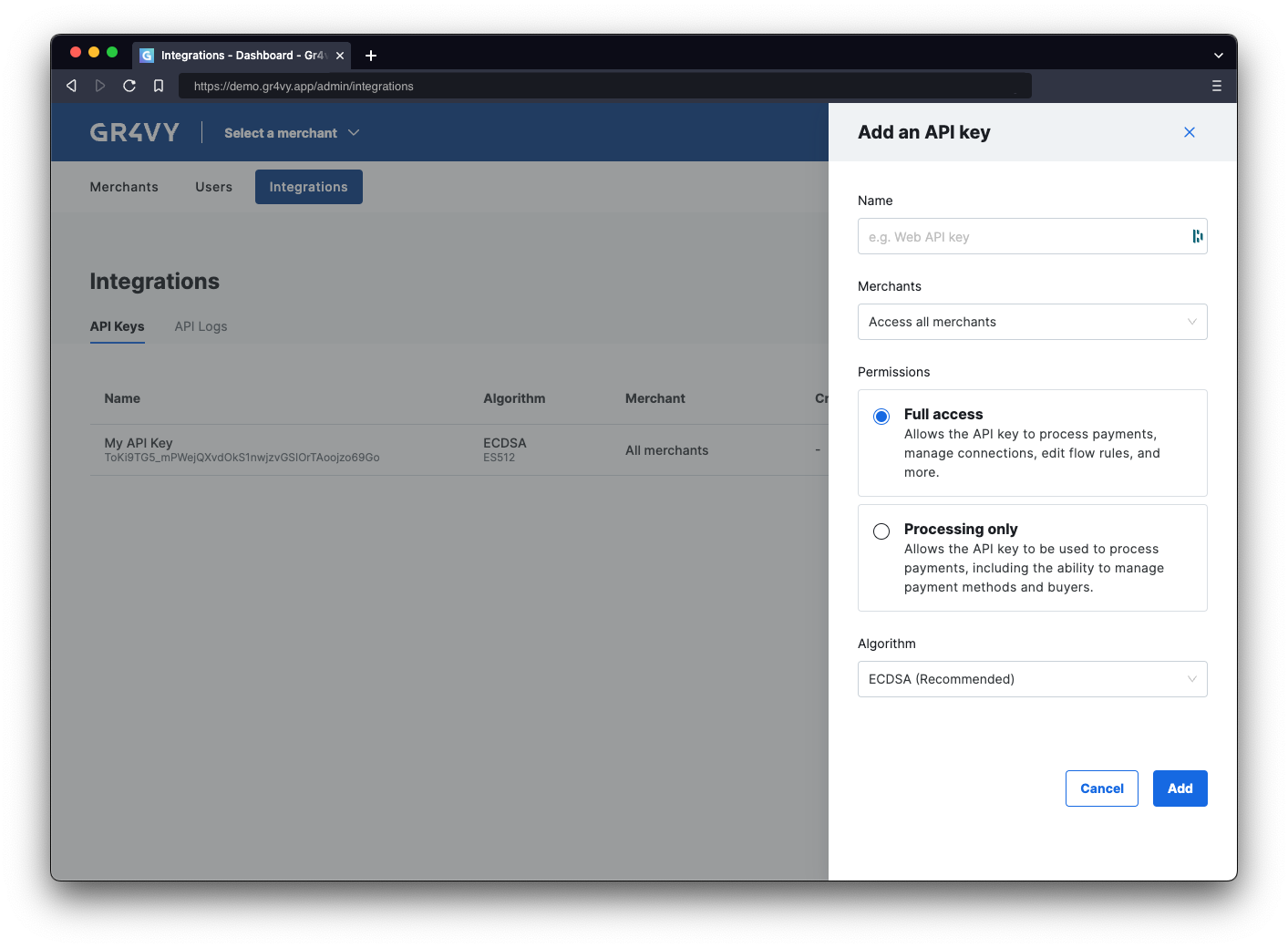
To create a new API key visit the **Integrations** panel in the dashboard and click the **Add API key** button.
The API key can be stored with the code or in a secure environment accessible to the
app.
 ### Merchants access
If the instance has **Multi Merchant** enabled, select whether the API key can
access **All merchants** or only one. It is recommended to restrict an API key to only one merchant account when integrating
into Embed, the SDKs, or the e-commerce platforms like Magento, Salesforce Commerce Cloud, and commercetools.
### Permissions
When creating an API key, select the role that matches how the key is used. A role is a named, fixed set of [scopes](#scopes), and it determines which APIs the key can access within the merchants it can reach.
| Role | Access |
| :----------------------------- | :----------------------------------------------------------------------------------------------------------------------------------------------------------------------- |
| **Full access** | Process payments, manage connections, edit flow rules, and manage other resources. |
| **Processing only** | Process payments, including the ability to manage payment methods and buyers. This role also grants read access to reports. |
| **System management only** | Manage connections and edit flow rules. This role cannot process payments or modify existing payments such as captures and refunds. |
| **Transaction reporting only** | Read payments data, including the ability to create and access reports. This role is read-only and cannot access system data such as users, flow rules, and connections. |
It is recommended to use **Processing only** for any API keys used with the e-commerce platforms like Magento, Salesforce Commerce Cloud, and commercetools.
You can change the role of an existing API key from the **Integrations** panel without deleting and recreating the key. Reassigning a role is the supported way to change the scopes applied to a key.
API access can be further reduced by setting a restrictive set of
[scopes](#scopes) on the JWT.
### Algorithm
The API supports 2 algorithms for signing JWTs, namely ECDSA and RSA. It is recommended to use ECDSA unless the environment
does not support this stronger and newer algorithm. The RSA algorithm is available for those environments
that do not support ECDSA. RSA keys provide considerably less security for the same key size and are currently not
supported by the SDKs.
## Generate JWT
When not using one of the SDKs, or an SDK in the
language is not available, construct and sign the
JWT with one of the many libraries available on [`jwt.io`](https://jwt.io).
At the high level a JWT is build up out of 3 pieces:
* A **header** defining the algorithm and key used to create the JWT.
* A set of **claims** that define the token's scope and other permissions.
* A cryptographic **signature** based on the header and the claims, signed using
the private key.
Combine, these 3 pieces make up the JSON Web Token (JWT). See
[`jwt.io`](https://jwt.io) for more details on the specification and available
libraries for generating JWTs.
### JWT header
The JWT header defines the type of encryption algorithm as well as the private
key used to generate the signature.
```json theme={"system"}
{
"typ": "JWT",
"alg": "ES512", // OR RS512 depending on your key
"kid": "d757c76acbd74b56"
}
```
The `typ` and `alg` are fixed and do not allow for other values. The `kid` is
the ID of the private key, which can be found in the **Integrations** panel of
the dashboard.
### JWT claims
The claims define when the token was created and what access it has.
```json theme={"system"}
{
"iss": "My JWT Generation Tool",
"nbf": 1607976645,
"exp": 1607977245,
"jti": "0fe1fb1b-2f7e-4c8d-b0eb-aae5d0ec98f7",
"scopes": ["transactions.read"],
"embed": {
"amount": "200",
"currency": "AUD",
"buyer_id": "d757c76a-cbd7-4b56-95a3-40125b51b29c",
"metadata": { "key": "value" },
"cart_items": [
{
"name": "Joust Duffle Bag",
"quantity": "1",
"unit_amount": "9000",
"tax_amount": "0"
}
]
}
}
```
### Claims
The API supports the following JWT claims.
| | Description | Required |
| --------------------- | :------------------------------------------------------------------------------------------------------------------------------- | :------- |
| `iss` | A unique ID that represents your code making this call. This helps identify what library made a call to the API. | Yes |
| `nbf` | The UNIX timestamp (in seconds) that this token was created at. | Yes |
| `exp` | The UNIX timestamp (in seconds) that this token expires at. | Yes |
| `iat` | An optional UNIX timestamp (in seconds) for your internal use to indicate when the token was issued. | No |
| `jti` | A random unique ID used for cryptographic entropy. This needs to be unique for each JWT. | Yes |
| `scopes` | A list of scopes that give this token access to the API. | Yes |
| `embed` | A dictionary of key-value pairs used to pin the amount, currency, and buyer info for use in Embed. | No |
| `checkout_session_id` | The ID of a checkout session. This can be used to tie multiple transactions together as having originated from the same session. | No |
**Checkout sessions**
When using a server-side SDK, the recommended way to populate the `checkout_session_id` claim is the `getEmbedTokenWithCheckoutSession` helper, which creates a checkout session and returns an Embed token with the ID already pinned. See [generating a token](/guides/payments/embed/quick-start/sdks).
**Timestamps**
Please be aware that the `nbf`, `exp`, and `iat` values are UNIX timestamps defined as seconds since January 1, 1970 (UTC). Some programming languages return UNIX timestamps as milliseconds,
requiring the removal of the last three digits.
### Scopes
The API supports the following values for the `scopes` claims.
| Scope | Description |
| :---------------------- | :----------------------------------------------------------------------------------------------------------------------------------------------------------- |
| `*.read` | Allows read-access to any resource. This is used by default in the SDKs |
| `*.write` | Allows write-access to any resource. This is used by default in the SDKs. This does not also allow read access. |
| `{resource_name}.read` | Allows read-access to a type or resource. For example, `payment-services.read` enabled read-access for buyers data. |
| `{resource_name}.write` | Allows write-access to a type or resource. For example, `payment-services.write` enabled write-access for buyers data. This does not also allow read access. |
| `embed` | A scope that represents all the access needed by Embed. |
The following resource names are recognized. Please see the reference documentation for more details as to what scope
is required per endpoint.
* `anti-fraud-services`
* `api-logs`
* `buyers`
* `buyers.billing-details`
* `card-scheme-definitions`
* `checkout-sessions`
* `connections`
* `digital-wallets`
* `flows`
* `payment-methods`
* `payment-method-definitions`
* `payment-options`
* `payment-service-definitions`
* `payment-services`
* `reports`
* `transactions`
### Signature & assembly
Finally, the JWT signature is generated by appending the Base64 encoded header
and claims (separated with a `.`) and run it through the key's algorithm.
```bash ECDSA theme={"system"}
ECDSASHA512(
base64UrlEncode(header) + "." +
base64UrlEncode(payload),
public_key,
private_key
)
```
```bash RSA theme={"system"}
RSASHA512(
base64UrlEncode(header) + "." +
base64UrlEncode(payload),
public_key,
private_key
)
```
The assembled JWT is then formed by appending the Base64 encoded header, claims,
and signature separated by a full stop.
```
base64UrlEncode(header) + "." + base64UrlEncode(payload) + "." + base64UrlEncode(signature)
```
### Merchants access
If the instance has **Multi Merchant** enabled, select whether the API key can
access **All merchants** or only one. It is recommended to restrict an API key to only one merchant account when integrating
into Embed, the SDKs, or the e-commerce platforms like Magento, Salesforce Commerce Cloud, and commercetools.
### Permissions
When creating an API key, select the role that matches how the key is used. A role is a named, fixed set of [scopes](#scopes), and it determines which APIs the key can access within the merchants it can reach.
| Role | Access |
| :----------------------------- | :----------------------------------------------------------------------------------------------------------------------------------------------------------------------- |
| **Full access** | Process payments, manage connections, edit flow rules, and manage other resources. |
| **Processing only** | Process payments, including the ability to manage payment methods and buyers. This role also grants read access to reports. |
| **System management only** | Manage connections and edit flow rules. This role cannot process payments or modify existing payments such as captures and refunds. |
| **Transaction reporting only** | Read payments data, including the ability to create and access reports. This role is read-only and cannot access system data such as users, flow rules, and connections. |
It is recommended to use **Processing only** for any API keys used with the e-commerce platforms like Magento, Salesforce Commerce Cloud, and commercetools.
You can change the role of an existing API key from the **Integrations** panel without deleting and recreating the key. Reassigning a role is the supported way to change the scopes applied to a key.
API access can be further reduced by setting a restrictive set of
[scopes](#scopes) on the JWT.
### Algorithm
The API supports 2 algorithms for signing JWTs, namely ECDSA and RSA. It is recommended to use ECDSA unless the environment
does not support this stronger and newer algorithm. The RSA algorithm is available for those environments
that do not support ECDSA. RSA keys provide considerably less security for the same key size and are currently not
supported by the SDKs.
## Generate JWT
When not using one of the SDKs, or an SDK in the
language is not available, construct and sign the
JWT with one of the many libraries available on [`jwt.io`](https://jwt.io).
At the high level a JWT is build up out of 3 pieces:
* A **header** defining the algorithm and key used to create the JWT.
* A set of **claims** that define the token's scope and other permissions.
* A cryptographic **signature** based on the header and the claims, signed using
the private key.
Combine, these 3 pieces make up the JSON Web Token (JWT). See
[`jwt.io`](https://jwt.io) for more details on the specification and available
libraries for generating JWTs.
### JWT header
The JWT header defines the type of encryption algorithm as well as the private
key used to generate the signature.
```json theme={"system"}
{
"typ": "JWT",
"alg": "ES512", // OR RS512 depending on your key
"kid": "d757c76acbd74b56"
}
```
The `typ` and `alg` are fixed and do not allow for other values. The `kid` is
the ID of the private key, which can be found in the **Integrations** panel of
the dashboard.
### JWT claims
The claims define when the token was created and what access it has.
```json theme={"system"}
{
"iss": "My JWT Generation Tool",
"nbf": 1607976645,
"exp": 1607977245,
"jti": "0fe1fb1b-2f7e-4c8d-b0eb-aae5d0ec98f7",
"scopes": ["transactions.read"],
"embed": {
"amount": "200",
"currency": "AUD",
"buyer_id": "d757c76a-cbd7-4b56-95a3-40125b51b29c",
"metadata": { "key": "value" },
"cart_items": [
{
"name": "Joust Duffle Bag",
"quantity": "1",
"unit_amount": "9000",
"tax_amount": "0"
}
]
}
}
```
### Claims
The API supports the following JWT claims.
| | Description | Required |
| --------------------- | :------------------------------------------------------------------------------------------------------------------------------- | :------- |
| `iss` | A unique ID that represents your code making this call. This helps identify what library made a call to the API. | Yes |
| `nbf` | The UNIX timestamp (in seconds) that this token was created at. | Yes |
| `exp` | The UNIX timestamp (in seconds) that this token expires at. | Yes |
| `iat` | An optional UNIX timestamp (in seconds) for your internal use to indicate when the token was issued. | No |
| `jti` | A random unique ID used for cryptographic entropy. This needs to be unique for each JWT. | Yes |
| `scopes` | A list of scopes that give this token access to the API. | Yes |
| `embed` | A dictionary of key-value pairs used to pin the amount, currency, and buyer info for use in Embed. | No |
| `checkout_session_id` | The ID of a checkout session. This can be used to tie multiple transactions together as having originated from the same session. | No |
**Checkout sessions**
When using a server-side SDK, the recommended way to populate the `checkout_session_id` claim is the `getEmbedTokenWithCheckoutSession` helper, which creates a checkout session and returns an Embed token with the ID already pinned. See [generating a token](/guides/payments/embed/quick-start/sdks).
**Timestamps**
Please be aware that the `nbf`, `exp`, and `iat` values are UNIX timestamps defined as seconds since January 1, 1970 (UTC). Some programming languages return UNIX timestamps as milliseconds,
requiring the removal of the last three digits.
### Scopes
The API supports the following values for the `scopes` claims.
| Scope | Description |
| :---------------------- | :----------------------------------------------------------------------------------------------------------------------------------------------------------- |
| `*.read` | Allows read-access to any resource. This is used by default in the SDKs |
| `*.write` | Allows write-access to any resource. This is used by default in the SDKs. This does not also allow read access. |
| `{resource_name}.read` | Allows read-access to a type or resource. For example, `payment-services.read` enabled read-access for buyers data. |
| `{resource_name}.write` | Allows write-access to a type or resource. For example, `payment-services.write` enabled write-access for buyers data. This does not also allow read access. |
| `embed` | A scope that represents all the access needed by Embed. |
The following resource names are recognized. Please see the reference documentation for more details as to what scope
is required per endpoint.
* `anti-fraud-services`
* `api-logs`
* `buyers`
* `buyers.billing-details`
* `card-scheme-definitions`
* `checkout-sessions`
* `connections`
* `digital-wallets`
* `flows`
* `payment-methods`
* `payment-method-definitions`
* `payment-options`
* `payment-service-definitions`
* `payment-services`
* `reports`
* `transactions`
### Signature & assembly
Finally, the JWT signature is generated by appending the Base64 encoded header
and claims (separated with a `.`) and run it through the key's algorithm.
```bash ECDSA theme={"system"}
ECDSASHA512(
base64UrlEncode(header) + "." +
base64UrlEncode(payload),
public_key,
private_key
)
```
```bash RSA theme={"system"}
RSASHA512(
base64UrlEncode(header) + "." +
base64UrlEncode(payload),
public_key,
private_key
)
```
The assembled JWT is then formed by appending the Base64 encoded header, claims,
and signature separated by a full stop.
```
base64UrlEncode(header) + "." + base64UrlEncode(payload) + "." + base64UrlEncode(signature)
```